POS and online payments for barbershop

Let clients pay through your mobile app and website for services and products. Charge for no-show and late cancellation. Use security deposit, refundable and non-refundable prepayments. Let barbers connect their own payment providers and receive payments directly. Connect payment devices and terminals.

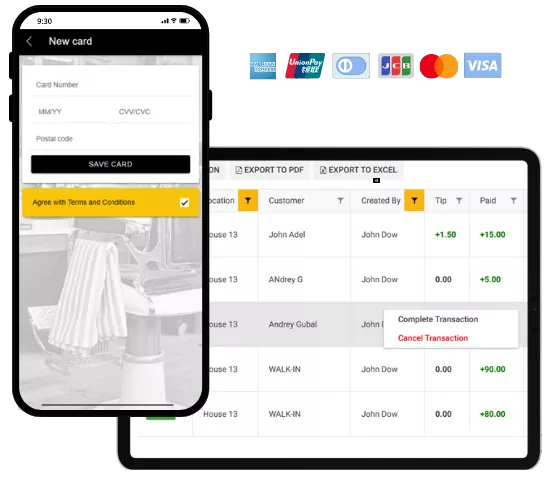
Accept payments through your mobile app and website

  • Accept payments for services and products
  • Charge for no-shows and late cancellations
  • Ensure the security of your appointments by offering options for security deposits and full or partial upfront payments
  • Each of your team members has the option to connect their own payment provider for added flexibilit
  • Integrate payment devices and terminals
  • Customize payment policies and settings to fit your business needs

Integrate payment providers that you already use and trust:

Barbershop POS system
Flexible payment options

Payment policies for appointments

1

Security deposit

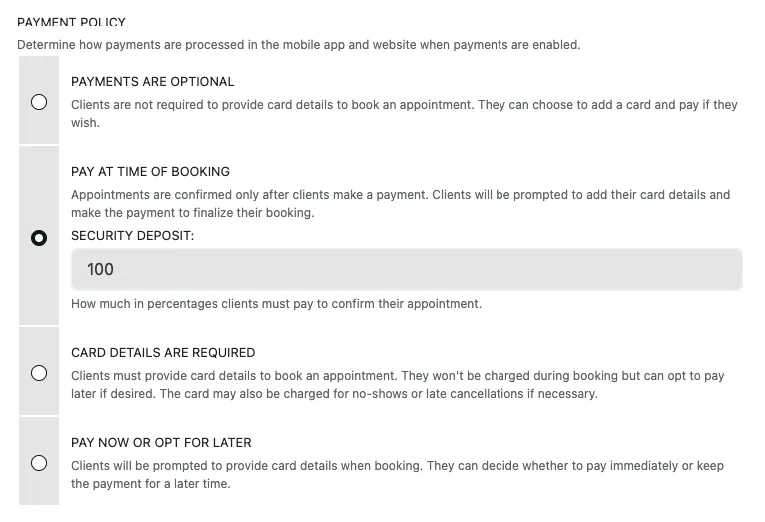
Customers must pay a deposit to confirm the appointment. The amount of the deposit can be adjusted. The value ranges from 1% to 100%.

2

Card on file — pay later

Clients must provide their payment card details to confirm an appointment but may pay later. Card on file allows charging for no-show and late cancellation.

3

Payment is optional

Clients can pay when they book or later but it's not required to confirm an appointment.

Barbers may activate their own payment providers

Barbers may activate their own payment providers

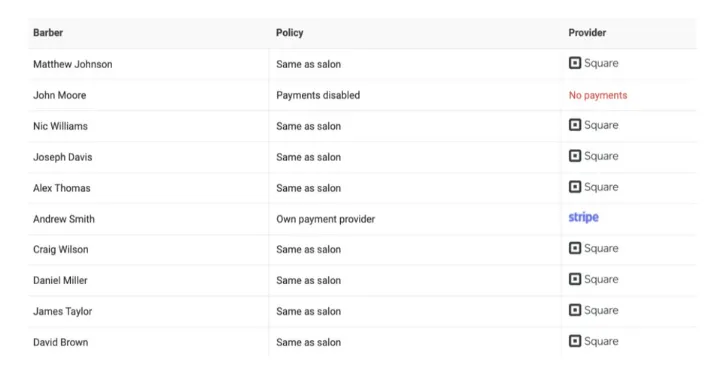
Barberly allows individual payment providers. Each barber may either inherit payment provider and settings from barbershop, or activate own payment provider or disable payments at all.

Barbers may activate their own payment providers

Charge for no-show and late cancellation

Charge for no-show and late cancellation

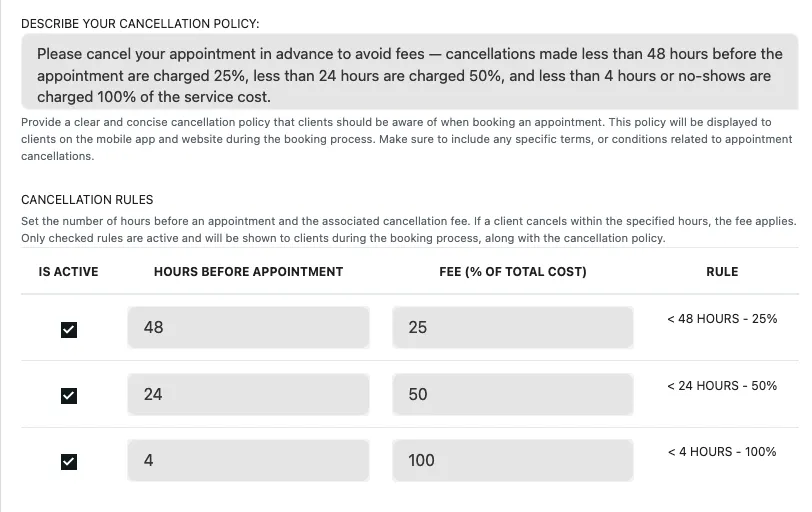
Set up a policy for late cancellations and no-shows. Set the cancellation fee depending on how early the client cancels the appointment. Allows you to automatically charge for cancellations and no-shows, or charge manually depending on the client's situation.

Charge for no-show and late cancellation

Security deposit for appointment

Security deposit for appointment

Secure a no-show fee with the deposit feature. Set any value from 1% to 100% that a client has to deposit to confirm an appointment.

Security deposit for appointment

Frequently asked questions

What payment providers does Barberly support?

Barberly currently supports Stripe, Square, Revolut and SumUp. These providers allow you to accept online payments during booking as well as in-person card payments in your barbershop.

Does Barberly charge commission on payments?

No. Barberly does not charge any commission on payments. You only pay the standard transaction fees charged by your selected payment provider.

Can barbers receive payments directly to their own accounts?

Yes. Barbers connect their own account with one of the supported payment providers and all payments go directly to that account. Barberly does not hold, route or store your funds.

Can I use a payment provider that is not supported?

No. At the moment Barberly only supports Stripe, Square, Revolut and SumUp. Payment integrations require complex technical and security work, but we continuously add new providers, so you can contact support to check whether your provider is planned or currently in development.

Can some barbers accept payments while others do not?

Yes. Barberly allows flexible setups where some barbers use the salon's payment provider, some connect their own provider, and others disable payments completely so clients pay in person.

Can I connect a card terminal device?

Yes. Barberly supports Stripe WisePOS terminals, Square terminals and Revolut terminals, allowing you to accept card payments directly in the barbershop during checkout.

Do clients have to pay when booking an appointment?

No. This depends on your booking settings. You can allow bookings without payment, require clients to provide card details only, require a configurable security deposit, or require full payment in advance.

Can I charge clients for no-shows or late cancellations?

Yes. To charge cancellation or no-show fees you need to require clients to save their card details when booking. You can then configure a cancellation policy with deadlines and fees, and either charge clients automatically or charge them manually depending on the situation.

Can clients still book if I disable online payments?

Yes. Payments are optional in Barberly, so clients can book appointments normally and pay in person at the barbershop if you choose not to enable online payments.

Explore Barberly by features

It's free to try. We hope you do

Access all Barberly features completely free for 30 days.
Start Free Trial
No credit card required